Messages
Grab the code
Reads the 2FA text the moment it lands and types it where it's needed
Works on Android and iPhone Give your AI thumbs
Opposable connects the AI you already use to the phone in your pocket. Ask for something in the chat and it opens the right app, reads the screen, and taps and types until it's done, signed in as you.
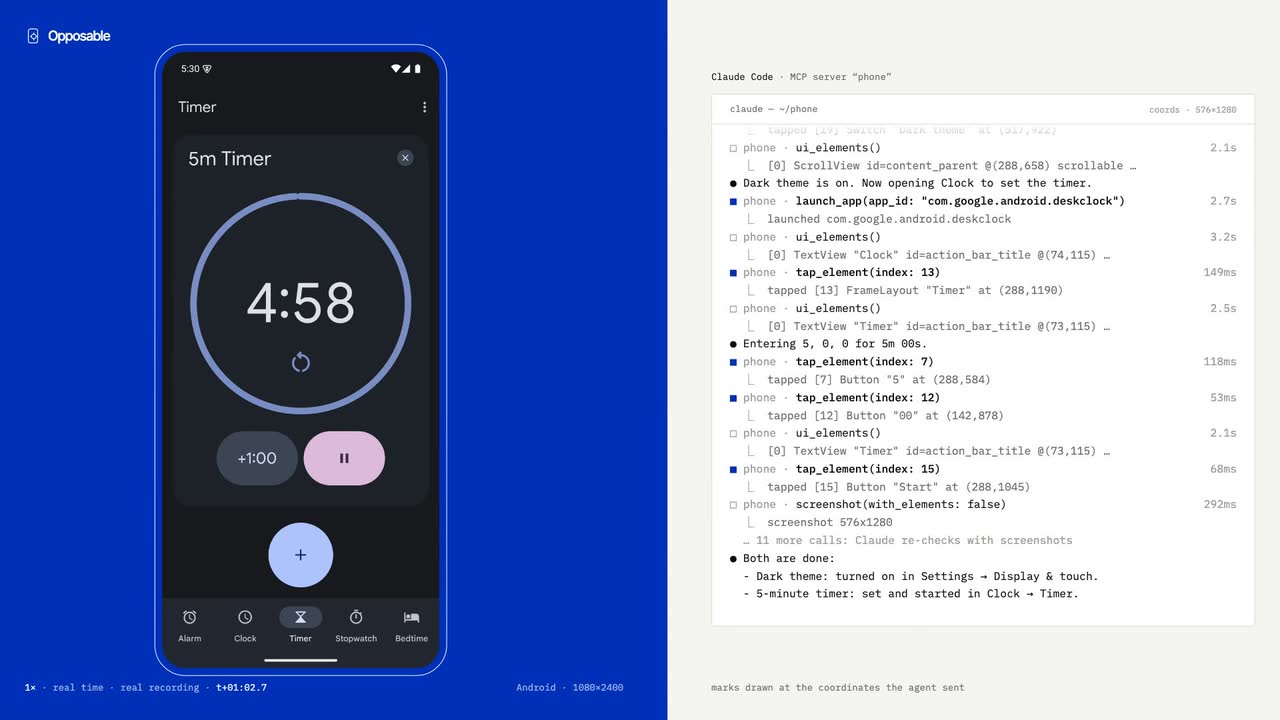
YouTurn on dark mode on my phone and set a 5-minute timerClaudeDone. Dark theme is on and the timer is running.A real run on an Android phone. Watch itHave an iPhone? Opposable for Mac connects it to Claude through your Mac, with nothing to install on the phone.Get Opposable for Mac
What people ask it to doMessages
From: Bank
01What you can ask
Messages
Reads the 2FA text the moment it lands and types it where it's needed
Bank
Opens your banking app, checks the amount, and stops for your OK before paying
Chat
Replies in your chat apps in your voice, with the whole thread in mind
Rides
Books the ride, picks the pickup point, sends you the driver's ETA
Shop
Finds last week's grocery order and puts it back in the basket
Inbox
Archives, replies, and moves the invites into your calendar
Payments and purchases stop and wait for your Approve tap, on every plan. Your agent does the twenty taps; you make the one that matters.
02Recorded runs
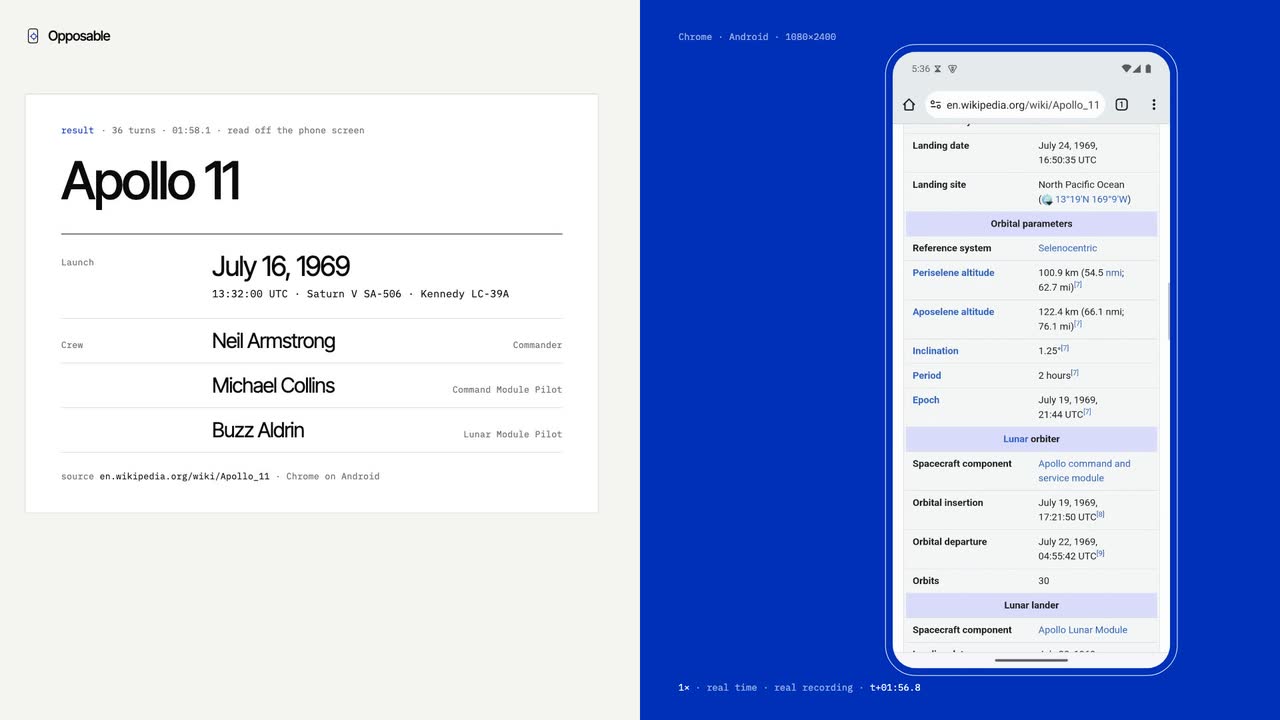
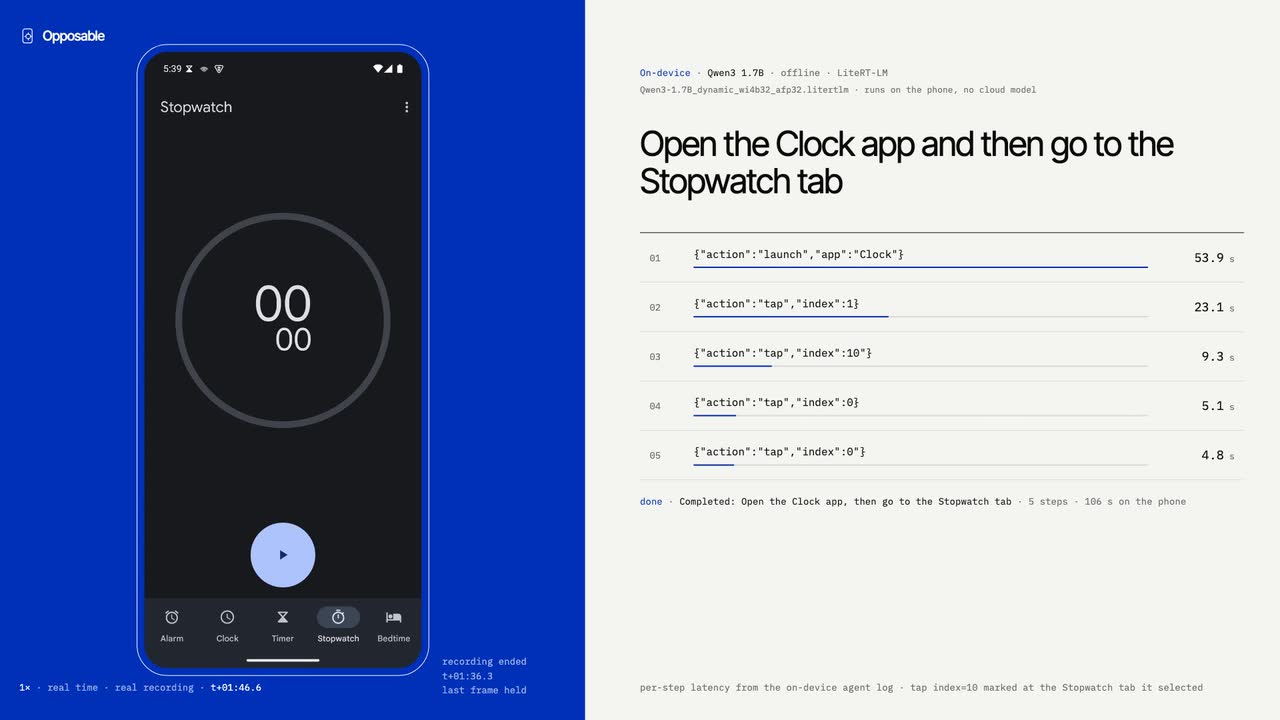
Unedited screen recordings of real agent runs, with their actual timings and costs.
NewClaude and ChatGPT connector
Opposable also works as a connector. Once it's added, you can ask Claude or ChatGPT to do something on your Android phone, from a browser or from the chat app on the phone itself.
1Install the app
Scan this with your phone's camera to download the app there. Then open it and turn Opposable on in Settings › Accessibility. It's free and needs Android 11 or later.
Then open it and turn Opposable on in Settings › Accessibility. It's free and needs Android 11 or later.
On an iPhone? The connector needs an Android phone for now, but Opposable for Mac lets your agent use an iPhone through your Mac (beta).
2Add the connector
https://getopposable.com/mcpEither way you land on our page to sign in, pick your phone and allow access. Free for 14 days per phone, then part of Pro. Step-by-step instructions
Get started
Android 11+ · free
On a computer? Scan with your phone's camera to download it there.
Beta · with a Mac
Your Mac pairs with your iPhone as a Bluetooth keyboard and pointer and sees the screen over a cable or AirPlay, so your agent can tap and type in every app. No jailbreak, no app on the phone, nothing extra to buy. Just download the Mac app. On Windows or Linux, a small Opposable Stick does the Bluetooth part.
From $19/mo
Rent a private Android phone in our cloud. Install your apps from Google Play, Aurora Store or an APK, sign in once in the browser, then connect your agent over MCP.
See cloud phones03How it works
Over USB, over Wi-Fi, or from anywhere through the relay: the phone keeps one outbound connection, so there is no port to forward.
A screenshot, plus the screen as a list of labelled elements with their positions. Cheap enough to read on every step.
[17] TextView "Dark theme"
[18] TextView "Display & touch"  @(288,811)
[19] Switch  desc="Dark theme"   @(517,922)
clickable, uncheckedTaps, swipes, typing in any language, system keys, opening apps and links. Every call reports what it actually did.
tap_element  index | text
swipe        up | down | left | right
type_text    "Zürich ✓", submit
launch_app   "Chrome"
press_key    back | home | enter
Drive it from Claude Code or Codex on the subscription you already have, or hand the whole task to the free agent built into the app.
claude-code   via MCP
codex         via MCP
cursor        via MCP
opposable     on the phone, free
The app shows its address and a token. Paste one command and the phone is a tool in your next session.
claude mcp add --transport http --scope user phone https://<id>.p1.getopposable.com/mcp \
--header "Authorization: Bearer <token>"04Delegate it
Your agent hands the phone a task, the phone does it locally, and only the result comes back.
$ curl phone/api/do -d '{
    "task": "check my bank balance" }'

{ "status": "done",
  "result": "Checking account: EUR 2,418.30",
"seconds": 11.2 }MCP for Claude Code and Codex, or a plain REST endpoint and webhooks for cron jobs, n8n and Zapier
Schedule a task daily or every few minutes. The phone wakes, does it, and messages you the outcome
Done once, saved as a recipe and replayed with no model in a few seconds
Reads the 2FA code from your texts, clears the pop-ups, and asks you only for the one tap a person has to make
05On-device
Most phone agents send your screen to a model in a data centre. Ours runs on the phone it operates, so it keeps working with the laptop closed or with no signal, and your screen never leaves the device. It's small enough to download once over Wi-Fi, and it gets faster with every release.
06Pricing
Everything that runs on your phone is free, including scheduled tasks and payment approvals. Pro pays for our relay, which carries your agent's requests to the phone when the two aren't on the same network, and for recipe sync between phones.
$0
Free forever. Your phone, your network, your model.
$8/mo
Reach your phone from anywhere. $79 a year; founding members $5/mo for life.
14 days of remote access free, no card. Pro is $5/month (founding) after that.
Cancel anytime
$29/mo
For people running agents on several phones.
14 days of remote access free, no card. Power is $29/month after that.
Cancel anytime
Do you need Pro? If the phone sits on the same Wi-Fi as your computer, or on a USB cable, Free is enough. Pro is for when they're apart: the phone on mobile data while Claude Code runs on your desk, a chat in the Claude app reaching the phone at home, or a server sending the phone a task at night. Every phone gets the relay free for its first 14 days, so you can see whether you use it before paying.
07Cloud phones
A private virtual Android phone you sign into once. Some banking apps refuse to run on virtual phones; your own phone has no such limits.
Founding cohort pricing: early cloud-phone subscribers keep their launch price for as long as they stay subscribed
$19/mo
One phone that sleeps when idle and wakes on the next MCP call
If it doesn't work for what you need in the first 3 days, email us and we'll refund it. Cancel anytime.
See how it works$49/mo
One always-on phone for agents that work around the clock
If it doesn't work for what you need in the first 3 days, email us and we'll refund it. Cancel anytime.
See how it works$149/mo
Three always-on phones for parallel agents or separate accounts
If it doesn't work for what you need in the first 3 days, email us and we'll refund it. Cancel anytime.
See how it works08Investors and partners
Banking, rides, delivery, messaging, the two-factor prompt in the middle of every workflow. Reval Labs is building the layer that lets agents use them, on the phone you own and on phones we run for you.
09Questions
On Android 11 or newer, download the app above and open it. Android asks once to allow installs from your browser; if Play Protect warns you, tap More details › Install anyway. Then turn Opposable on in Settings › Accessibility. If the switch is greyed out, Android is protecting you from apps installed outside the Play Store: open App info › ⋮ › Allow restricted settings and try again. Finally, tap Pair in the app and enter the code at getopposable.com/connect; it gives you the command for Claude Code, Codex or Cursor. For unattended use, keep the phone charging and unlocked.
Yes, in beta, with a Mac. Opposable for Mac pairs with the iPhone as a Bluetooth keyboard and pointer and sees its screen over a cable or AirPlay, so your agent can tap and type in every app, with no jailbreak and no app on the phone. On Windows or Linux, a small Opposable Stick you buy for about $8–13 does the Bluetooth part, and you can install its firmware from your browser.
Anything that speaks MCP. For Claude Code it's one claude mcp add --transport http command; Codex takes a few lines in ~/.codex/config.toml.
No. Claude Code or Codex do the thinking on the subscription you already pay for, and the agent built into the app runs on the phone itself for free. If you want, the app can also use your own API key or a model on your network.
A virtual Android 15 phone that runs for you alone. It comes with Google Play, Aurora Store and F-Droid, and you can upload your own APKs. You sign in to your apps through a browser viewer, then connect your agent to its private HTTPS endpoint with one command. Google Play asks you to register the phone once, because it's virtual; the phone's Apps page walks you through it. Apps that refuse to run on virtual phones, such as some banking apps, won't work.
Whoever holds the token can operate the phone, so treat it like a password. The server listens on localhost unless you allow the network, and payments always wait for your Approve tap.
Free on Android today. iPhone works with a Mac, in beta.
Or scan with your phone's camera